You may select from any of the services listed below.
If you don’t see what you need, or you have a special request and require some custom work then get in touch!


If you don’t see what you need, or you have a special request and require some custom work then get in touch!
Accessibility Widget
Allow your viewers to control their experience by adjusting font size, line height, letter spacing, etc. Also reduces the possibility of legal action resulting from non-compliance with ADA (the Americans with Disabilities Act). We will provide an Accessibility Statement page.
You should be able to see an icon on the right side of this page that looks like this:

Or at bottom left on mobile. Clicking the icon brings up a menu of options that lets your viewers adjust a number of aspects of the appearance of your website, including contrast, font size, letter spacing, and line height.
All settings can be reset to default using the “Reset All Accessibility Settings” button at the bottom of the widget window. We also provide an “Accessibility Statement” page explaining how the widget works.
Providing this capability allows elderly users or those with specific conditions such as dyslexia to more easily use your website and to enhance their experience.
Automatic Copyright Notice
The copyright notice, usually located in the bottom footer, will automatically increment on January 1st every year.
If your website has a bottom footer with an out-of-date copyright notice, no copyright notice, or one that does not identify the current year, then we can add code that will automatically update this notice every year. It should say something similar to: “Copyright © Your Company Name. All rights reserved.”
Favicon
What is a favicon? It is the tiny graphic, usually your logo, that is displayed in the browser tab and in the bookmarks/favorites list. It can also accompany a description in a search engine result list.
A favicon is important for brand recognition reasons and appears in number of different places including browser tabs, bookmarks/favorites and history, search engine results, and a home screen shortcut or app icon when a user saves the page on their mobile device. It looks like this:
Improve Footer Layout
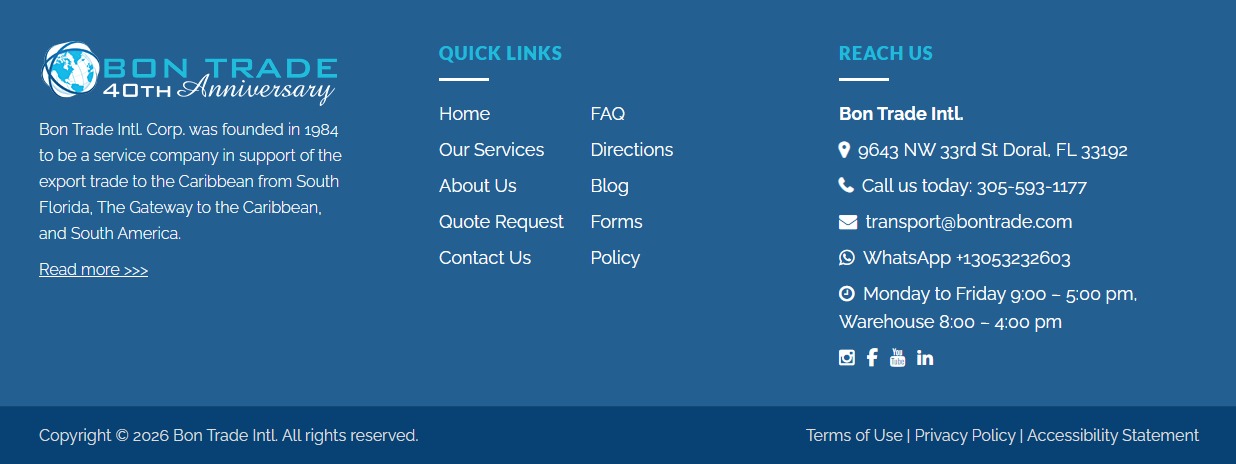
Many website footers are poorly designed. An upper footer should generally contain a statement about your website, links to important pages, contact information, and links to social media. Bottom footers usually display copyright information and links to “legal” pages (Privacy Policy, Terms of Use, etc.).
Many footers are poorly designed and are often underestimated as a key location for important information on websites. Footers appear on every page and, depending on your website purpose, should be properly branded and have a short description, links to important pages, and contact information including social media links.
Some footers can also contain Google Maps, newsletter subscription forms, and other elements.
Additionally, many footers are subdivided into top and bottom footers. Typically, bottom footers consist of a copyright notice and sometimes links to “legal” pages such as Privacy Policy and Terms of Use information.
An example of a footer layout containing different sections of interest to viewers:
Embed YouTube Videos
Display featured videos, or present an entire gallery of YouTube videos for your users to view.
A gallery of a selection of your most recent YouTube videos can appear at a location of your choosing on your website. This means that you can decide which specific videos should be featured, or that we can simply show, for example, a grid of the 12 most recently-posted videos.
Your viewers can click to view the videos directly in your website or optionally go to your YouTube channel to watch them there. Videos can be either landscape or portrait orientation (usually these are “shorts”, such as the one below):
Live Instagram Feed
An embedded Instagram feed that automatically gets updated whenever something new is posted, so that it is always up-to-date.
It’s possible to embed a live Instagram feed at a location (or several locations) of your choice on your website. This means that whenever you or your staff makes an Instagram post it will automatically appear on the website as well.
While we usually show a grid of two rows and four columns of the most recent posts, we can adjust this to your preferences (for example, one row of four columns).
Citrine Instagram feed goes here . . .
Add Social Media Buttons & Links
Ensure that your website is cross-linked with all of your social media accounts; icons and links can be placed in the header, footer, your contact page, or in other locations of your choosing.
Popups for Promotions and Announcements
Popup messages can be appear when someone visits the home page, or any specific page. They can contain information on promotions, announcements, or even contact and subscription forms.
Popup messages are extremely flexible; you can show a sale, promotion, or other announcement which appears on the home page (or any other specific page of your choosing). It can be set so that once the viewer closes the popup then it will not appear again until after a set period of time (say, a month).
Additionally, popups can contain anything you would like in addition to an announcement – for example, a contact form to capture information (such as for a newsletter subscription), images, or even videos.
Add Google Analytics / Meta Pixel
Make sure you are tracking your website traffic; we can ensure that your site is connected to these important services.
Google Analytics or Meta Pixel code can be added to the code of your site which will allow you to track website traffic, the sources of your traffic, the geographic location of your traffic, and the flow of this traffic through your website.
This information is essential, particularly in the case of sales or promotions so that you can more easily determine the success of your online promotional campaigns. Without this data, it’s very difficult to know if your advertising dollars were well-spent and if improvements can be made. You can track the success of multiple campaigns and see how many visitors viewed each page.
A Google or Facebook/Meta account are needed in order to generate the required code but these accounts are free to set up.
Embed Google Reviews
Do you have a great Google Review rating? Make sure your visitors know about! We can also show a selection of recent reviews as well as giving users an opportunity to leave a review themselves.
Google Reviews are very important for many businesses. If your potential customers are serious about purchasing products or inquiring about your services they will pay attention to these reviews, which are trusted far more than curated testimonials or other types of reviews.
If you have a great review rating, promote it! A selection of the most recent reviews can be embedded in a section on your website home page or on a dedicated Reviews page. Additionally, a button can be provided to let viewers submit their own review.
Home Page Slider
An eye-catching slider feature for your home page, featuring high-quality photos that automatically transition to each new slide. This is an opportunity for you to draw visitors’ attention to subjects that you would like them to see in one of the most important areas on your website: the top of the home page.
A slider is a feature that shows a series of images (slides) that can also contain text, buttons, and other elements that automatically transitions to the next slide after a set period of time (usually around 7 seconds). You can have as many slides as you want, but either 3 or 4 are recommended. Each slide usually focuses on a specific subject, such as a promotion, announcement, or some particular aspect of your business and can click to a page with more information on that subject.
While a slider is usually placed on a home page, it can be implemented on any page on your website. Photos and information on the subject of each slide must be provided.
Featured Posts Section or News Page
Add a “Latest News” section featuring your blog or news posts, or a full news page that automatically gets updated every time you post a new article.
A slider is a feature that shows a series of images (slides) that can also contain text, buttons, and other elements that automatically transitions to the next slide after a set period of time (usually around 7 seconds). You can have as many slides as you want, but either 3 or 4 are recommended. Each slide usually focuses on a specific subject, such as a promotion, announcement, or some particular aspect of your business and can click to a page with more information on that subject.
While a slider is usually placed on a home page, it can be implemented on any page on your website. Photos and information on the subject of each slide must be provided.
Lightbox
A lightbox is a new section that appears over top of your existing content, with the background greyed out. You can let larger-sized photos or other information appear in a lightbox, as well as videos or contact forms.
A slider is a feature that shows a series of images (slides) that can also contain text, buttons, and other elements that automatically transitions to the next slide after a set period of time (usually around 7 seconds). You can have as many slides as you want, but either 3 or 4 are recommended. Each slide usually focuses on a specific subject, such as a promotion, announcement, or some particular aspect of your business and can click to a page with more information on that subject.
While a slider is usually placed on a home page, it can be implemented on any page on your website. Photos and information on the subject of each slide must be provided.
Sticky Header
This means that your header (logo, navigation menu, and sometimes other elements) follows you down the page as you scroll. This ensures that the menu links are immediately accessible at all times.
A slider is a feature that shows a series of images (slides) that can also contain text, buttons, and other elements that automatically transitions to the next slide after a set period of time (usually around 7 seconds). You can have as many slides as you want, but either 3 or 4 are recommended. Each slide usually focuses on a specific subject, such as a promotion, announcement, or some particular aspect of your business and can click to a page with more information on that subject.
Viewers can skip ahead to the next slide or go backward by using navigation arrows or navigation dots (the latter of which also indicates the total number of slides).
While a slider is usually placed on a home page, it can be implemented on any page on your website. Photos and information on the subject of each slide must be provided.
Improve Footer Layout
Many website footers are poorly designed. An upper footer should generally contain a statement about your website, links to important pages, contact information, and links to social media. Bottom footers usually display copyright information and links to “legal” pages (Privacy Policy, Terms of Use, etc.).
Many footers are poorly designed and are often underestimated as a key location for important information on websites. Footers appear on every page and, depending on your website purpose, should be properly branded and have a short description, links to important pages, and contact information including social media links.
Some footers can also contain Google Maps, newsletter subscription forms, and other elements.
Additionally, many footers are subdivided into top and bottom footers. Typically, bottom footers consist of a copyright notice and sometimes links to “legal” pages such as Privacy Policy and Terms of Use information.
An example of a footer layout containing different sections of interest to viewers:
Add Testimonials
Make sure your viewers know what positive statements that your customers have made about you! A selection of statements can be displayed, which automatically rotate.
Do you have some great testimonials from customers or clients that you would like to feature on your website? We can create a section that will display a curated selection of these statements.
They can be presented as a series of boxes that automatically transition from one to the next. Viewers can also interact with the testimonials by scrolling ahead by means of arrows/dots or by just grabbing the carousel and pulling it forward or back.
A minimum of 3 and a maximum of 6 testimonials are recommended.
Seasonal / Holiday Updates
Make your website look fresh for each new season or holiday. We can add special special seasonal elements for occasions that you choose.
Why not dress up your website for holidays and/or other special occasions? We can make eye-catching styling adjustments and enhancements that start and end at certain times of year.
For example, would you like a special green-and-red theme for Christmas, or animated falling snow? We can add jack-o’-lanterns and ghosts for Halloween or hearts for Valentine’s Day. Perhaps New Years or other occasions such as Mother’s Day is important for your business. Let us know what you need and we can make it happen.
Clickable Email Addresses & Phone Numbers
Why make your visitors go to extra work to contact you? Ensure that all email addresses and phone numbers are clickable; this is particularly important for mobile users, so that they can simply click on a number to dial it on their phone.
So many websites make the mistake of not making all email addresses and phone numbers clickable. We will evaluate all of the links on your website and make sure they have the correct code. Social media icons and links should also click to the right locations, and should come up in a new browser tab so that your website is still available.
Making links clickable is particularly important for mobile users – you want to ensure that if someone finds your information on their phone that they can simply touch a link in order to dial.
Mobile Optimization
Make sure your website looks good on mobile devices – this involves reviewing each page and all elements in order to adjust the presentation and make it look as good as possible on smaller screens.
So many people now consume digital content on their mobile devices that it is essential that your website be properly optimized to look as good as possible on smaller screens. Logos sometimes look strange (are too big or too small or are misaligned) and spacing between elements often works differently on mobile screens than on desktop platforms. These need to be checked and adjusted so that the appearance and aesthetics of your website works as well as it can for mobile screens.
It’s also possible to hide certain sections or menu links on mobile only. Remember that a lack of optimization leading to layout problems can reflect poorly on the reputation of your business or organization.
Photo Gallery / Photo Carousel
Showcase a selection of your most impressive photos in a grid layout, or alternatively in a carousel feature that automatically slides to each new photo.
An example of a photo carousel. The photos can transition at a speed of your choosing, and viewers can interact with the carousel not only by clicking the navigation dots underneath, but also just by grabbing the photos with their mouse (or finger on mobile devices) and moving them.





Language Switcher
Let visitors choose their language from a dropdown menu; your website content will automatically be translated to the new language. We can add any selection different languages that you would like to let your uses choose.
Save Contact Form Messages
Ensure that you will never lose any messages submitted from the contact forms on your website! You can also export all messages and download them into a spreadsheet application.
Create New Subdomains
A useful feature that lets you create special links to a target of your choosing. For example, we can create something like something.yourdomain.com which will immediately take your visitor to a particular page or document (such as a PDF file). This makes it easy to promote certain links to send or post.
FAQ Expandable / Collapsible Sections
Rather than providing a one long list of questions and answers, it’s possible to let viewers click a question or button and have a new section open up to reveal the answer or further information. This is a very space-efficient and visually appealing way to provide a large volume of content.
Reduce Contact Form Spam
Suffering from annoying spam messages from bots that are accessing your website contact forms? There are ways to greatly reduce or even eliminate this problem using methods such as reCAPTCHA that are able to distinguish between human users and programs.
Fix Contact Form Email Deliverability Issues
For various reasons related to DNS settings or “reputational” issues with a domain name, reliably receiving contact form messages can sometimes be a challenge. We understand that email reliability is extremely important, and can implement means to help ensure that your messages get delivered.
Conditional Navigation Menus
You can have a different menu for various pages, or even change the menu based on certain conditions. For example, you may want to use a different navigation menu for a landing page or a particular area of your website. Some links can also be selectively hidden.
Add Mega Menu
What is a mega menu? It’s a larger version of a standard dropdown menu that can extend across the page, show categories of links in columns, or even contain photos or other graphics.
Password Protection for Specific Pages
Do you want only certain people to see specific areas of your website. We can enable password access only for those pages.
Site Search
Would you like viewers to be able to search the content on your website, much like someone would use a search engine? We can add this capability.
Contact Form Spam Control
Do you find that you’re receiving many annoying spam messages from your website contact forms? We can reduce and in some cases completely eliminate this problem.
Add Landing Pages
A landing page is a standalone page on a website that can be used for a single focused marketing or advertising goal. For example, if you have a Google Ads, social media, or other promotional campaign then you can direct the traffic to that specific web page. It can have a different header, menu, or footer than the rest of the website.
Frequently Asked Questions Page
We can create an attractive and easy-to-use FAQ page in question and answer format. It uses expandable and collapsible question-and-answer sections so that your viewers can easily find information about the common questions they may have.
New Contact Forms
Basic contact forms usually consist of Name, Email, Phone, and Question/Comment boxes; once submitted, the information is sent by email to a recipient of your choice. However any number of further form elements can be added, such as dropdowns, checkboxes, or radio buttons with various options for the users to select. Additionally, any of these can be made mandatory so that the user is required to complete those questions before the form can be submitted.
Custom Animation from Featured Photo
Would you like an eye-catching animation placed on your site to draw attention to something that you would like viewers to notice? We can turn a still photo into a short video that continuously plays on a loop – some examples would be ocean waves or an airplane flying through clouds.
Maintenance Including Backups
Is your website important to your business? Protect your asset with regular backups. It is also essential to periodically update the website software to protect against vulnerabilities and also to take advantage of extra functionality that may get added from time to time. You will have the peace of mind of knowing that in the worst case your website can be restored the next day.
Tell Us What You Need!
The sky is the limit! Tell us what you have in mind and we will work with you to bring it to life. From solving website problems, to adding additional custom capabilities, and even developing a brand new site, we have the experience to assist with anything you might need.
If you have any social media accounts it’s extremely important to link to them from your website so that users can easily find them. The places where you would typically find social media links are in the footer, on the “Contact Us” page, and in page headers.
Social media links should always come up in a new browser tab so that the viewers still have access to your website.